A photograph from a local match can do more than one job. It might record the final score, capture the winning team, show the mood around the pitch, or simply give a club something worth posting the next morning. That mix is what makes AI editing useful, but it also creates a risk: an image can look cleaner while becoming less reliable.
If the picture contains information people may later rely on, accuracy should come first. A scoreboard, race number, sponsor logo, shirt number, timing display, or printed result is not just background detail. Improving the photo is fine; quietly changing what it says is not.
The easiest way to avoid that problem is to decide, before editing, which parts of the image are factual and which parts are open to interpretation.
Start with the details that matter
Before touching the photo, identify anything that needs to stay exact. On a football or basketball image, that may be the score, player numbers, names, or sponsor marks. On a race-day image, it could be a bib number or finish time.
Keep the original file. If possible, work from the highest-resolution version instead of one already compressed by a messaging app or social platform. If a number or word is genuinely unreadable, do not ask an AI model to “restore” it as though the missing information were known. Check another photo, the official results, or the event organizer’s records.
Generative image tools are very good at producing details that look believable. A believable number is still the wrong number if it was invented.
Edit what you can actually verify
Once the important information is identified, AI becomes much more practical. A prompt-based AI photo editor can handle jobs that would otherwise involve masks, layers, selections, or manual retouching.
You might brighten a dark team photo, remove an object from the edge, simplify a distracting background, or prepare a better crop for social media. The key is to compare the result with the original, especially around faces, text, logos, hands, and anything else that carries meaning.
Pixlio’s editor is built around that kind of reference-led workflow. You start with an existing image, describe the change in normal language, choose an available model, generate, and then inspect the result. If something is slightly off, the edited image can become the next reference for another pass instead of forcing you to start again.
That is often better than putting every instruction into one giant prompt. Make one change, check it, then continue. For real photographs, small and reviewable edits are easier to control.

A side-by-side check is usually enough
You do not need a formal quality-control process for every club photo. A simple before-and-after check catches most problems.
Look at the original and edited image next to each other. First check the factual elements: scores, text, names, numbers, logos. Then look at people. Has a face changed too much? Has a shirt number moved? Did the model alter a hand, badge, or object near the subject? Finally, check the wider scene for changes you never asked for.
If the image is meant to document what happened, stop once it is clear and usable. There is little value in polishing it until it looks synthetic.
Creative versions are a different kind of image
The same photo can also have a second life after its documentary purpose is finished. A club might want a player avatar, a fun end-of-season graphic, a coach gift, or an illustrated social post. In those cases, exaggeration is not a problem. That is the point.
That is where a dedicated caricature maker fits better than treating a general enhancement tool as a catch-all. Pixlio’s caricature workflow is designed for portrait transformation, with style directions such as Classic Caricature, Editorial Cartoon, Soft Friendly Caricature, and Bold Comic Caricature. The aim is to keep the person recognizable while deliberately changing the visual treatment.
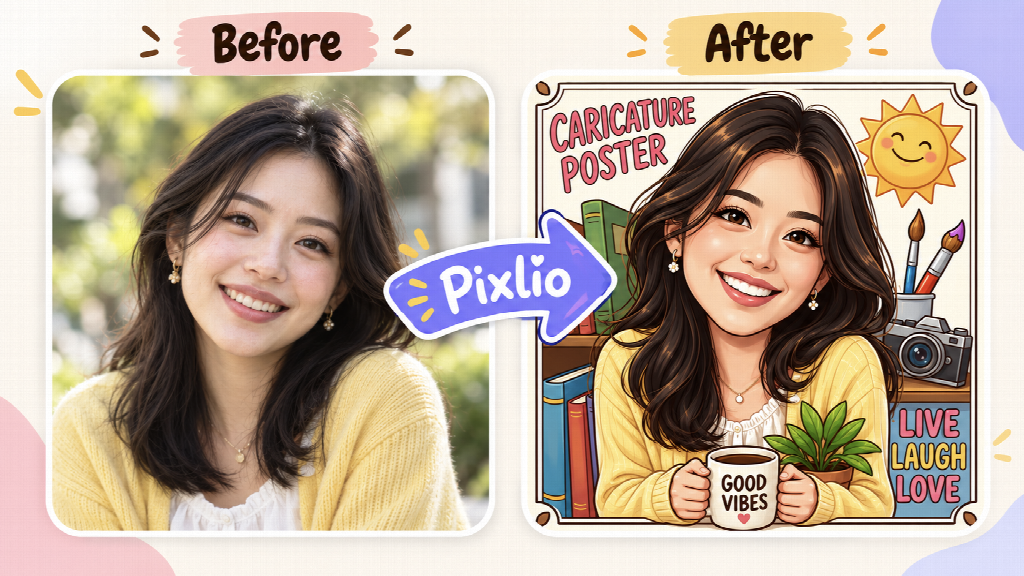
An awards-night portrait can become a playful profile picture. A coach photo can become a keepsake. A group shot can become something more illustrated and celebratory. Nobody expects those results to function as evidence of exactly how the original scene looked, so there is much more room to experiment.
The distinction is simple: preserve facts when the image is acting as a record; be expressive when it is clearly being used as artwork.
Think in terms of a creative workspace, not one isolated effect
Pixlio is broader than a single editor or filter. It works more like an AI image creative studio, with general editing alongside tools built for specific jobs.
An edited image can be refined again, upscaled, have its background removed, extended beyond the original frame, or sent into video creation. The handoff between tools makes it easier to keep working with the same visual instead of repeatedly downloading and uploading files.
There are also case-based tools for more specific outcomes. Photo to Painting suits a portrait or event image that needs an artistic treatment rather than ordinary retouching. The AI Book Cover Generator tackles a different problem: developing a cover concept around a genre and synopsis, then refining the visual direction and text separately. An AI Video Generator can take a finished still and use it as the starting point for motion.
These are very different tasks, but the underlying idea is the same: the tool should match the job. A scoreboard photo, a caricature, a painted portrait, and a book cover do not need the same controls or the same standard of visual accuracy.
Keep the original, and know what the edited version is for
AI image tools can save time for small clubs, local publishers, event organizers, bloggers, and people who do not want to learn professional design software. The best results still depend on a little judgment.
If an image contains a score, statistic, label, name, or other detail that may be quoted later, keep the source file and verify the edited version. If the goal is creative, make that obvious through the presentation and feel free to push the style further.
A cleaned-up match photo, an illustrated player portrait, and a comic-style coach caricature can all begin with the same camera file. What changes is the purpose. Once that purpose is clear, it becomes much easier to decide what AI should improve, what it should leave alone, and where it can be allowed to have some fun.